
Most teams do not have a productivity problem.
They have a coordination problem.
Work exists. People exist. Deadlines exist.
What breaks is everything in between.
Approvals sit in inboxes.
Updates live in WhatsApp threads.
Tasks disappear in meetings.
Managers spend their day chasing instead of leading.
That is where employee task automation comes in. Not dashboards. Not more software tabs. But systems that quietly move work forward without human nudging.
This guide walks through what to look for, how current tools compare, and what modern execution focused automation should really feel like.
What employee task automation should actually solve
Before comparing tools, it helps to define the real job.
Good automation should:
-
assign tasks automatically
-
follow up without reminders
-
escalate delays
-
collect updates
-
generate reports
-
close loops without manual tracking
If managers still need to ask “what’s the status?”, the system has not automated anything. It has only recorded information.
Tracking is not execution.
Execution is when the work moves by itself.
Most solutions fall into a few familiar categories.
Types of employee automation tools on the market

Project management platforms
Examples: Asana, ClickUp, Monday
Good for planning and visibility.
Weak at daily follow through.
They rely on:
• people opening the app
• updating tasks manually
• remembering to check boards
Which means adoption drops fast, especially for deskless or field teams.
Useful for strategy. Fragile for operations.

Workflow automation tools
Examples: Zapier, Make, Power Automate
Great for system to system automation.
You can connect tools and trigger actions:
• when a form is submitted
• when a file is uploaded
• when a CRM updates
But they do not manage human behavior well. They automate software, not people.
Helpful for back end processes. Limited for day to day employee work.
HR and workforce tools
Examples: attendance apps, leave systems, timesheets
These solve single problems:
• clock in
• leave requests
• payroll
They rarely integrate into the full workflow of how work actually happens.
You end up with five small tools instead of one system.

Execution layer automation (new category)
This is where modern platforms are moving.
Instead of forcing employees to log into another dashboard, work happens inside tools they already use, like WhatsApp or chat.
Tasks are:
• assigned automatically
• reminded automatically
• escalated automatically
• reported automatically
The system behaves like an operations manager.
This is where platforms like HÜSE sit.

HÜSE: task automation without dashboards
HÜSE approaches automation differently.
It is not a task board.
Not a chatbot.
Not another HR portal.
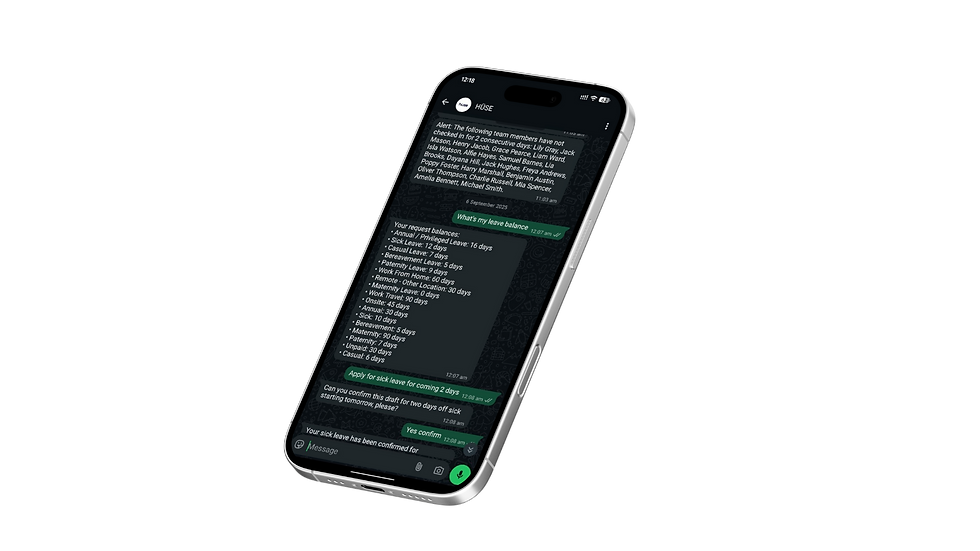
It acts as an AI execution engine inside chat.
Work happens where employees already are.
Inside WhatsApp.
Managers can:
• assign tasks
• approve requests
• trigger workflows
• collect check ins
• get reports
• enforce SLAs
All through simple messages.
Employees do not “use software”.
They respond naturally, the way they already communicate.
Behind the scenes:
• SOPs run automatically
• reminders fire on schedule
• delays escalate
• updates compile into reports
• KPIs generate themselves
So instead of tracking work, the system executes it.
The difference sounds small. In practice, it changes everything.
Managers stop chasing.
Teams stop waiting.
Operations move on time by default.
Employee automation tools comparison (practical view)
If you evaluate tools from an operations lens, the differences become clearer.
Traditional PM tools
Best for: planning
Weakness: requires manual discipline
Integration tools
Best for: system automation
Weakness: does not manage people
HR apps
Best for: specific functions
Weakness: fragmented
Chat native execution platforms like HÜSE
Best for: day to day execution
Strength: work happens automatically where employees already communicate
If your team spends more time following up than doing actual work, you do not need better tracking.
You need automated follow through.
How to choose the right task automation solution
Ask these questions before buying anything:
-
Do employees need to open another app every day?
If yes, adoption will drop.
-
Does the system remind and escalate automatically?
If not, managers will still chase.
-
Does it work for deskless teams and field staff?
If not, half your workforce is excluded.
-
Does it execute workflows or just display them?
Dashboards show problems. Execution solves them.
Can it run inside tools people already use like WhatsApp?
Lower friction means higher compliance.
The shift happening now
For years, companies added more software to improve productivity.
More dashboards.
More portals.
More reports.
But complexity increased.
Now the shift is toward invisible systems.
Tools that fade into the background and simply make work happen.
That is the real promise of employee task automation.
Not another place to log in.
A system that quietly runs the business for you.
.png)
.png)